Introduction
Oracle Database is engineered for the organizations to run their mission-critical workloads as the database service delivers automation, high performance, and strong security posture needed for these workloads. But their journey to cloud often halts on two fronts – the time required to provision secure, compliant environments and the risk of inconsistent configurations. Oracle Exadata eliminates the performance gap between on-prem and cloud databases. This is where OCI Landing Zones minimize the setup complexity. Together, they represent a transformative shift in how enterprises approach modernization.
What are OCI Landing Zones?
OCI Landing Zones are free, open-source Terraform templates designed to automate the creation of secure and compliant cloud environments on OCI. They help you deploy environments that follow Oracle and industry best practices, significantly reducing setup time.
You can deploy Landing Zone templates using GitHub, the OCI CLI, the OCI Console, Resource Manager, or Fleet Application Management, giving you complete flexibility in how you build your cloud foundation.
Core Architecture Pillars
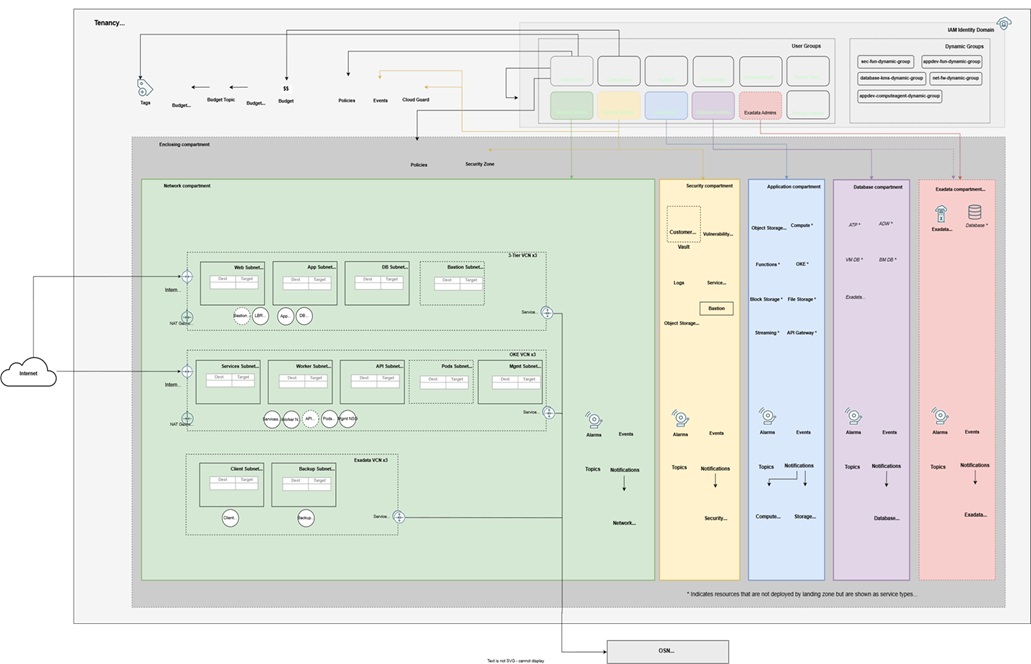
The OCI Core Landing Zone is built on three foundational pillars designed to eliminate the complexity of manual setup:
1. Organized Governance (Compartments & IAM)
- Hierarchy: Automatically creates a “Parent” compartment with sub-compartments for core services.
- Isolation: Ensures strict segregation of duties by assigning specific admin groups to each compartment.
- Access Control: Pre-configured IAM policies grant permissions only where needed, ensuring “Least Privilege.”
2. Flexible Networking (VCNs)
- Topologies: Supports standalone VCNs or Hub-and-Spoke architectures.
- Optimization: Specifically tailored for mission-critical workloads like Exadata Database Service or OKE.
- Ready-to-Go: Comes pre-configured with secure routing, subnets, and inbound/outbound interfaces.
3. Integrated Security (CIS Benchmarks)
- Compliance: Fully aligns with the CIS OCI Foundations Benchmark right out of the box.
- Security Stack: Deploys a suite of native services including:
- Monitoring: Cloud Guard and Flow Logs.
- Protection: Vault (encryption), Vulnerability Scanning, and Bastions.
- Visibility: Real-time notifications for resource changes via Events and Topics.
The following diagram shows the OCI Core Landing Zone reference architecture.
Exadata Database Service in OCI Landing Zones
OCI Landing Zones provide an automated and governed cloud foundation. With native support for Exadata Database Service, organizations can rapidly deploy robust, best-practice cloud environments that ensure consistency across regions and tenancies.
Key Business Benefits
Standardized automation
Deploy repeatable, best-practice baselines using Terraform across regions or tenancies. Core components include compartments for access control, VCNs and subnets, gateways, security lists, IAM groups, policies, and dynamic groups.
Faster time-to-value
Provision Exadata Cloud Infrastructure, VM Clusters, databases, and supporting services in hours instead of days.
Operational simplicity
Customize infrastructure, networking, storage, and maintenance. Configure database resources, scale seamlessly, integrate with other Landing Zone modules, and automate lifecycle management.
Strategic IT enablement
Accelerate onboarding of mission-critical workloads with cloud agility, resilience, and Exadata’s industry-leading performance for both new and existing environments.
What’s Included in the Exadata Database Service Module?
The module provides Terraform-ready automation to provision:
- Exadata Cloud Infrastructure: Configure Exadata models, server types and counts, maintenance schedules, and advanced options.
- VM Clusters: Customize OCPU/ECPU, memory, storage, networking, Grid Infrastructure version, licensing, automation settings, and tagging.
- Databases: Create and manage Database Homes, Container Databases, and Pluggable Databases with full control over names, character sets, versions, images, and backup configurations.
Deploying the OCI Core Landing Zone
Use the following guidelines as a foundation to design and configure security for your cloud environment. Consider that your specific requirements might differ from the architecture outlined here.
- Network Configuration:When selecting a CIDR block for your VCN, ensure it doesn’t overlap with any other networks (whether in OCI, your on-premises data center, or another cloud provider) to which you plan to establish private connections.
- Monitoring Security:Use Cloud Guard to monitor and maintain the security of your resources in OCI. Cloud Guard employs customizable detector recipes to identify security weaknesses in your resources and track risky activities by operators and users. When a misconfiguration or security issue is detected, Cloud Guard provides recommendations for corrective actions and can assist with implementing them using predefined responder recipes.
- Secure Resource Provisioning:For resources requiring the highest level of security, use security zones. A security zone is a compartment associated with an Oracle-defined policy set based on security best practices. For example, resources in a security zone must be inaccessible from the public internet and must be encrypted with customer-managed keys. OCI validates resource creation and updates within a security zone against these policies, automatically denying any operations that violate them.
Deployment
The Terraform code for this solution is available on GitHub. You can import the code into OCI Resource Manager with a single click, create the stack, and deploy the landing zone. Alternatively, you can download the code to your local machine, customize it, and deploy the architecture with the Terraform CLI.
Configuration at a Glance
Deploying is as simple as defining your intent in code. Here is a high-level example of how you define the Exadata rack and its maintenance schedule within the Landing Zone:
					module "exadata_db_service" {
  source  = "github.com/oci-landing-zones/terraform-oci-modules-exadata"

  display_name      = "Prod-Exadata-Rack"
  shape             = "Exadata.X10M" # High-performance X10M shape
  compute_count     = 2
  storage_count     = 3

  # Links to your Landing Zone Networking
  compartment_id    = var.db_compartment_ocid
  subnet_id         = var.client_subnet_ocid

  # Automated Maintenance Scheduling
  maintenance_window = {
    preference     = "CUSTOM_SCHEDULE"
    days_of_week   = ["SUNDAY"]
    hours_of_day   = [2] # 2:00 AM
  }
}
Depending on your comfort level with code, you will choose one of these two paths:
Option 1: Deploy Using the Sample Stack in Resource Manager
Deploy Using the Sample Stack in Resource Manager
Select to open Resource Manager in the OCI Console and create a stack.
If you’re not already signed into the Console, enter the tenancy and user credentials.
- Select the region where you want to deploy the stack.
- Follow the on-screen prompts and instructions to create the stack.
- After creating the stack, click Terraform Actions, and then select Plan.
- Wait for the job to be completed, and then review the plan.
- To make any changes, return to the Stack details page, click Edit Stack, and then make the required changes. Then, run the Plan action again.
- If no further changes are needed, return to the Stack details page, click Terraform Actions, and then select Apply.
Option 2: The “Code-Driven” Path (Terraform CLI)
Best for: DevOps pros who want to save their work in GitHub/GitLab.
- What you do: Run commands from your own computer or a build server.
- The Process:
- Install Terraform locally and download the module code.
- Write your settings into a file called terraform.tfvars.
- Run terraform plan to see a preview.
- Run terraform apply to build it.
- Benefit: Easier to automate for multiple environments (Dev, Test, Prod) and track changes over time.
Strategic Considerations for IT Leaders
Beyond the technical implementation, the adoption of OCI Landing Zones with Exadata Database Service carries significant strategic implications for enterprise IT organizations. Decision-makers should consider the following dimensions when considering this approach:
| Strategic Dimension | Business Impact |
| Total Cost of Ownership | Automated provisioning reduces engineer time spent on environment setup by 60–80%, reallocating skilled resources to higher-value cloud optimization and application migration work. |
| Risk Reduction | Codified security and compliance from day one eliminates the audit findings and remediation costs associated with manually provisioned environments that accumulate configuration debt over time. |
| Scalability | Terraform-based deployment means every new region, environment, or tenancy can be provisioned identically and rapidly. |
| Governance & Audit Readiness | Infrastructure-as-code provides a complete, versioned record of every configuration decision, thus simplifying internal governance reviews and external audits significantly. |
| Cloud Talent Efficiency | Standardised Landing Zone templates reduce the specialist knowledge required for environment provisioning, enabling a broader team to contribute to cloud infrastructure management. |
| Vendor Alignment | Deploying on Oracle’s own best-practice framework ensures full alignment with Oracle support, roadmap, and licensing requirements. |
The combination of Oracle Exadata Database Service and OCI Landing Zones represents a decisive answer to one of the most persistent challenges in enterprise cloud adoption: how to move quickly without sacrificing security, consistency, or governance.
OCI Landing Zones combined with the Exadata Database Service module simplify and accelerate your cloud migration journey. With built-in automation and best-practice frameworks, you can onboard quickly, securely, and with confidence. Leverage the module today to unlock the full potential of your cloud strategy.